1.Armbian查看流控开关是否开启: [crayon-694f575e7134c414942976/] 开启命令: [crayon-694f575e71351981993936/] 2.Openwrt修改mtu到1472

1.假如你宿主ip:192.168.1.6,容器ip:192.168.1.7 那么你新建一个macvlan2,并赋予额外一个ip,命令如下: [crayon-694f575e717d1532124702/] 2.修改路由,让宿主机到容器的数据经过macvlan2: [crayon-694f575e717d5081273756/] 注意:192.168.1.7 这个ip是容器ip 现在你可以在宿主中ping通容器了
server { listen 80; server_name _;#localhost; #access_log /var/log/nginx/host.access.log main; location / { root /etc/used; index index.php index.html index.htm; if (!-e $request_filename) { rewrite ^/index.php(.*)$ /index.php?s=$1 last; rewrite ^/xxxx.php(.*)…
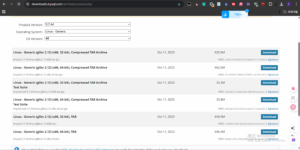
1.安装mysql 5.7 1.先去官网地址去下载: [crayon-694f575e71985851322248/] 然后下载自己适合的版本,我用的是64位: 使用下面命令下载到linux: [crayon-694f575e71989343825487/] 2.解压安装包 [crayon-694f575e7198a531887492/] 得到:mysql-5.7.44-linux-glibc2.12-x86_64.tar.gz mysql-test-5.7.44-linux-glibc2.12-x86_64.ta…
1./etc/config/AdGuardHome.yaml 注意账户密码需要自己重新填写:下面users:中的name:/passwarod: 密码生成器地址: [crayon-694f575e71cde058687034/] [crayon-694f575e71ce2258392601/] 2./etc/config/smartdns [crayon-694f575e71ce5271693585/]
1.安装油猴以及Github 增强 - 高速下载脚本: [crayon-694f575e71e9e327827997/] 或者: [crayon-694f575e71ea1052590375/] 2.然后去github下载页面 你会看到后面有一些下载路径,点击下载就可以了。
1.adguardhome需要备份的文件: [crayon-694f575e71fe5432444564/] 2.smartdns需要备份的文件: [crayon-694f575e71fe8542089726/] 配置文件夹: [crayon-694f575e71fe9838121091/]
1.安装docker [crayon-694f575e72144815788259/] 2.检查系统时间是否正确 [crayon-694f575e72148584337529/] 不正确的话用下面的命令设置下: [crayon-694f575e72149540795301/] 3. 这个是一键命令: [crayon-694f575e7214a429841359/] 4.下载并解压rootfs.tar.gz arm下载地址: [crayon-694f575e7214b817483438/] 如果是 x86-64 下载…
1. 下载软件 下载地址:https://github.com/adyanth/openwrt-tailscale-enabler/releases [crayon-694f575e72315140535101/] 2. 解压软件包 [crayon-694f575e72318355077397/] 3. 安装依赖包 [crayon-694f575e72319998414754/] 4. 设置开机启动,验证开机启动 [crayon-694f575e7231a988405601/] 5. 启动tailscale [cr…