1.安装mysql 5.7
1.先去官网地址去下载:
|
1 |
https://downloads.mysql.com/archives/community/ |
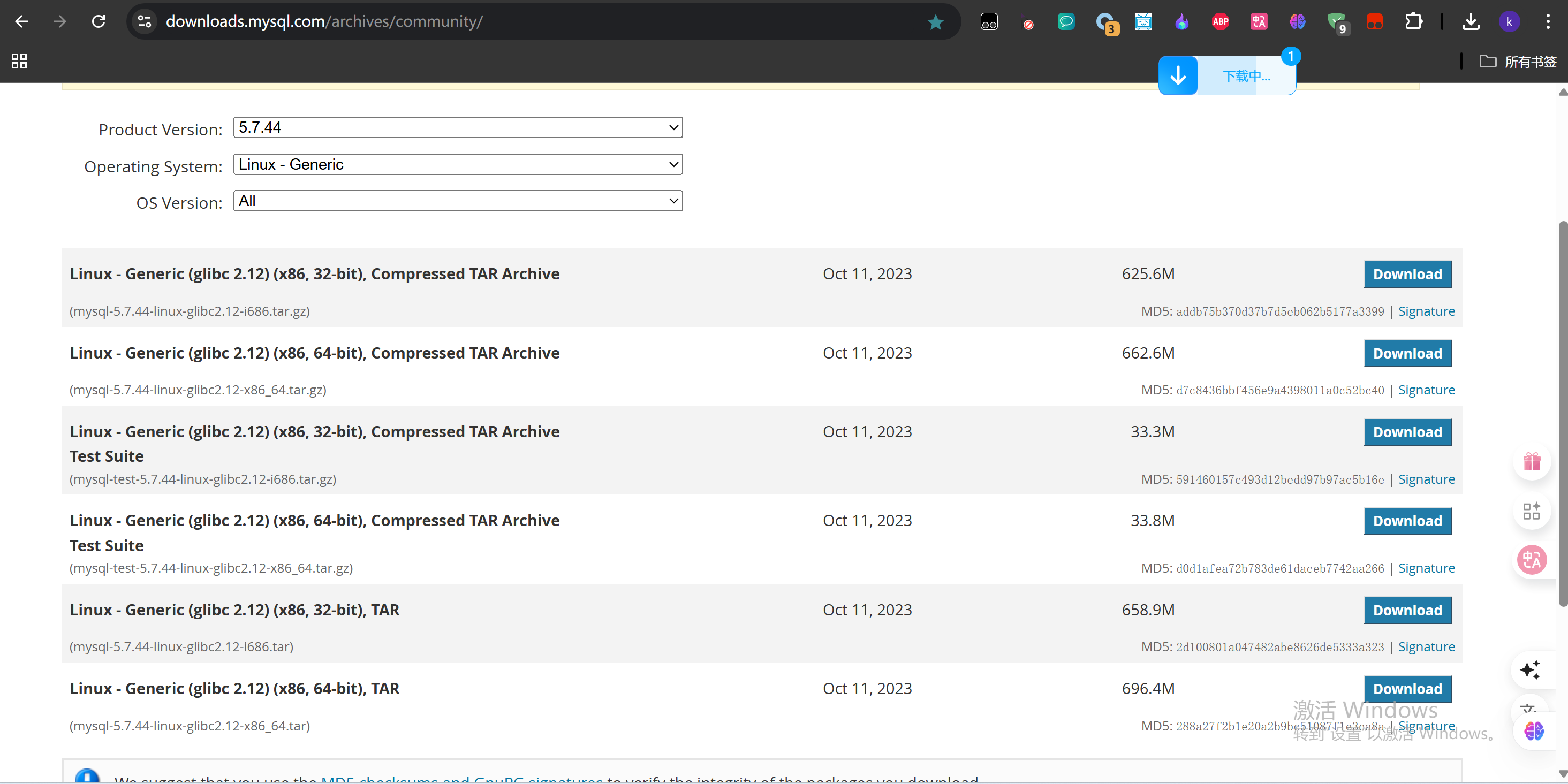
然后下载自己适合的版本,我用的是64位:
使用下面命令下载到linux:
|
1 |
wget https://downloads.mysql.com/archives/get/p/23/file/mysql-5.7.44-linux-glibc2.12-x86_64.tar |
2.解压安装包
|
1 |
tar -xvf mysql-5.7.44-linux-glibc2.12-x86_64.tar |
得到:mysql-5.7.44-linux-glibc2.12-x86_64.tar.gz
mysql-test-5.7.44-linux-glibc2.12-x86_64.tar.gz
3.然后再解压:
|
1 |
sudo tar -zxvf mysql-5.7.44-linux-glibc2.12-x86_64.tar.gz |
得到:mysql-5.7.44-linux-glibc2.12-x86_64
4.复制文件到指定目录
|
1 |
sudo mv mysql-5.7.44-linux-glibc2.12-x86_64 /usr/local/mysql |
5.需改用户归属
|
1 |
sudo chown $(whoami) /usr/local/mysql |
6.进入文件,初始化数据库
|
1 2 |
cd /usr/local/mysql sudo bin/mysqld --initialize --user=mysql |
提示:bin/mysqld: error while loading shared libraries: libaio.so.1: cannot open shared object file: No such file or directory
7.使用源码安装libaio,下载源码libaio-0.3.112.tar.gz
|
1 |
git clone https://gitee.com/src-oepkgs/libaio.git |
解压源码包:
|
1 |
tar zxvf libaio-0.3.112.tar.gz |
编译:
|
1 2 3 4 5 |
sudo apt update sudo apt install build-essential cd libaio-0.3.112/ make sudo make install |
8.初始化:
|
1 |
sudo bin/mysqld --initialize --user=mysql |
报错:
|
1 2 3 4 5 |
提示: 2025-07-13T09:38:18.808416Z 0 [Warning] TIMESTAMP with implicit DEFAULT value is deprecated. Please use --explicit_defaults_for_timestamp server option (see documentation for more details). 2025-07-13T09:38:18.811559Z 0 [ERROR] Fatal error: Can't change to run as user 'mysql' ; Please check that the user exists! 2025-07-13T09:38:18.811580Z 0 [ERROR] Aborting |
9.添加用户
|
1 2 |
sudo groupadd mysql sudo useradd -r -g mysql -s /bin/false mysql |
10:重新初始化,会得到密码,需要自己记录下:
|
1 |
sudo bin/mysqld --initialize --user=mysql |
注意:记录下初始密码:
|
1 |
A temporary password is generated for root@localhost: xxxxxxxx |
11:复制配置文件:
|
1 2 |
sudo cp support-files/mysql.server /etc/init.d/mysql sudo chmod +x /etc/init.d/mysql |
12:设置环境变量:
在~/.bashrc或/etc/profile中添加以下行:
|
1 |
export PATH=/usr/local/mysql/bin:$PATH |
然后运行source ~/.bashrc或重新登录。
13:启动MySQL服务:
|
1 |
sudo /etc/init.d/mysql start |
14:输入mysql:
|
1 |
mysql |
提示缺少相关库:
|
1 |
mysql: error while loading shared libraries: libncurses.so.5: cannot open shared object file: No such file or directory |
创建符号链接:
|
1 |
sudo ln -s /usr/lib/x86_64-linux-gnu/libncursesw.so.6.4 /usr/lib/x86_64-linux-gnu/libncurses.so.5 |
还是缺少libtinfo:
|
1 |
mysql: error while loading shared libraries: libtinfo.so.5: cannot open shared object file: No such file or directory |
创建符号链接:
|
1 |
sudo ln -s /usr/lib/x86_64-linux-gnu/libtinfo.so.6.4 /usr/lib/x86_64-linux-gnu/libtinfo.so.5 |
如果想删除符号链接:
你可以先检查一下这个文件或链接是什么:
|
1 |
ls -l /usr/lib/x86_64-linux-gnu/libncurses.so.5 |
然后再删除:
|
1 |
sudo rm /usr/lib/x86_64-linux-gnu/libncurses.so.5 |
15.设置root密码(如果需要):
先登录mysql:
|
1 |
mysql -u root -p |
然后输入默认密码。
接着修改原始密码:
|
1 |
ALTER USER 'root'@'localhost' IDENTIFIED BY 'xxxxxx'; |
安装php7.4
1.更新 APT 软件包信息索引
|
1 |
sudo apt update |
2.将 ondrej/ppa 源添加到您的 APT 源
|
1 |
sudo add-apt-repository ppa:ondrej/php |
当系统提示将 PPA 添加到您的 APT 源时,按 此键 Enter
3.更新 APT 程序包索引以应用 PPA 存储库信息
|
1 |
sudo apt update |
4.安装 PHP 7.4
|
1 |
sudo apt install php7.4 -y |
5.检查已安装的 PHP 版本并验证它是否为 7.4
|
1 |
php -v |
6.安装常见的 PHP 7.4 扩展
|
1 |
sudo apt install php7.4-mysql php7.4-gd php7.4-xml php7.4-zip php7.4-mbstring php7.4-curl php7.4-json -y |
安装 PHP 7.4 FPM
1.更新 APT 软件包信息索引
|
1 |
sudo apt update |
2.安装 PHP 7.4 FPM
|
1 |
sudo apt install php7.4-fpm -y |
3.使 PHP 7.4 FPM 服务在引导时启动
|
1 |
sudo systemctl enable php7.4-fpm |
4.启动 PHP 7.4 FPM 服务
|
1 |
sudo systemctl start php7.4-fpm |
5.检查 PHP 7.4 FPM 状态并验证它是否处于活动状态并正在运行
|
1 |
sudo systemctl status php7.4-fpm |
6.列出 /etc/php/7.4/fpm/ 目录中的文件,并验证 php-fpm.conf 文件是否可用
|
1 |
ls /etc/php/7.4/fpm |
7.使用文本编辑器(如 vim)打开 www.conf 默认配置
|
1 |
sudo vim /etc/php/7.4/fpm/pool.d/www.conf |
8.验证 [www] 池配置名称
|
1 |
[www] |
9.验证运行池的用户和组配置
|
1 2 |
user = www-data group = www-data |
默认情况下,PHP-FPM 使用 www-data 用户和组在服务器上运行。指定其他用户将允许 PHP-FPM 运行并与其他应用程序交互。
安装nginx
apt install -y nginx

文章评论